
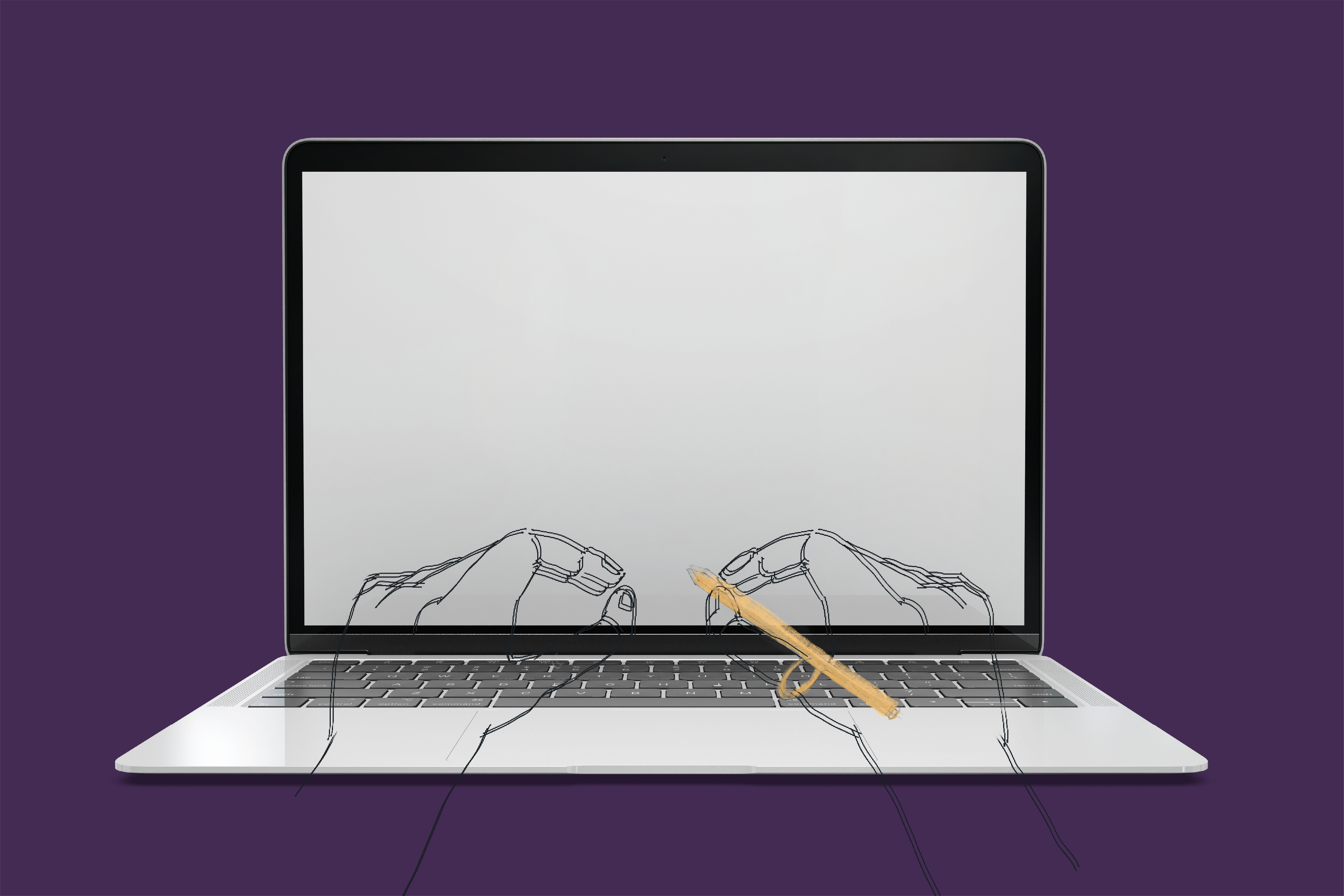
Many artists, designers, and students often use a stylus when they wish to create and convey contents.Occasionally, they would only use a stylus with a tablet, e.g., an Apple Pencil with an iPad; however, they are often accompanied by other input devices, including a keyboard, a trackpad, and/or a mouse. These diverse input devices allow users to switch between each of them for different tasks. For instance, users would type on a keyboard when they need to write an essay or a diary, while they would prefer a stylus for drawing or handwritten notes.
Though this diversity has indeed allowed users to create contents in an easier way, there is one clear disadvantage. When users switch their input devices for a different task, it requires an extra amount of time and effort. To illustrate, when a user stops typing and wishes to use a stylus, they need to move one hand to pick up a stylus from the desk and adjust the grip to find the ideal position. After they are finished with their task using a stylus, they would put the stylus on the desk and move their hand once again to resume typing.

For heavy users, such as artists, designers, and students, who would have to switch between different input devices for dozens of times in an hour, facilitating this device-switching process presents an opportunity where we could make their experience much faster and easier. There are many ergonomic styluses available in the market, like Scriba (in the picture above), which is made of elastic material and a hollow body that aim to alleviate user’s muscle fatigue. However, they often fail to consider a crucial phase of their user experience which is to facilitate the device-switching process.

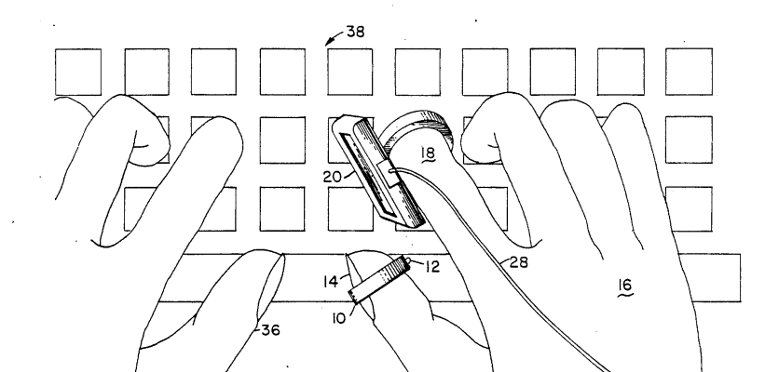
In order to acquire useful information for redesigning a stylus, I discovered two patented products on the US Patent Office database. The first product is a finger worn graphic interface device that uses the form factor of a ring (Levine, 1990). Users could use the stylus ring point (12) on their thumb and the X-Y digitizing finger palette (20) on their index finger to convey the coordinate information. As users could easily switch from typing on a keyboard to using this finger worn device, this product saves user’s action of reaching for the mouse and a tablet. This idea of using the form factor of a ring could also be employed in my redesign of a stylus since my objective is also to facilitate the device-switching process.
However, I believe there could be two potential problems of using this specific type of finger worn device. Firstly, since the finger palette on the index finger is miniaturized, I believe the precise mapping of X-Y pixel points would be challenging. Secondly, the interface cable wire (28) could interrupt user’s typing action. In my redesign, I will address these two concerns by using the form factor of a pen and wireless charging.
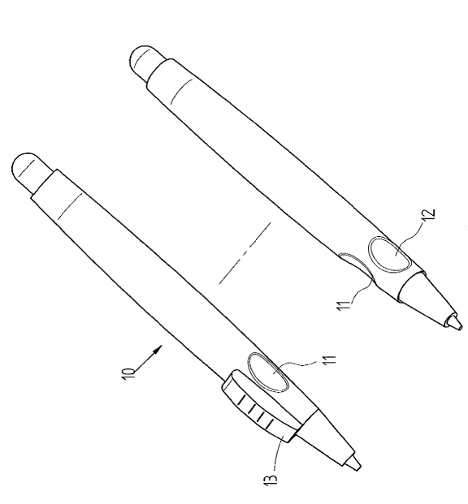
Another patented product is the ergonomic pen with a convex device (Cheng, 2010). This product focuses primarily on reducing the discomfort that can be caused by using a stylus for a long time. When a user exerts a force with an index finger on the convex member (13) on a normal stylus, it requires the support of the thumb and the middle finger. In the long term, this could cause hand muscle soreness, fingers pain, wrist damage, and body pain. To address this concern, this product uses two indentations (11 and 12) for a thumb and a middle finger, respectively, which allows the fingers to be placed in a relatively relaxed position. Considering these issues of reducing muscle pain, I intend to incorporate these ergonomic features in my redesign of a stylus.
Two human factors standards could be crucial in redesigning a stylus. Firstly, according to an ANSI/HFES human factors standard that pertains to computer workstations, the diameter of a stylus plays a key role in determining user’s comfort, grip, and effectiveness (Human Factors and Ergonomics Society, 2007). This guideline advises that the diameter should be between 7.0 and 20.0 mm (0.28 and 0.79 in.). As mentioned previously, the primary user of a stylus would be artists, designers, and students who would use a stylus for a long period of time. Thus, abiding by this detailed guideline could alleviate user’s fingers pain or muscle soreness when using the redesigned stylus.
In addition, the length of a stylus should also be considered because this measure affects user’s effectiveness. The human factors guideline advises that the length of a stylus should be between 120 and 180 mm (4.7 and 7.1 in.), which is based on the anthropometric measures and conventional practice (Human Factors and Ergonomics Society, 2007). In redesigning a stylus, I will abide by these two human factors standards on the diameter and length of a stylus.
I have also conducted a literature review to examine the feasibility of implementing the technology that could be applied to the redesign of a stylus. According to researchers at Microsoft Research, to identify the orientation of a stylus, we could plant inertial sensors—an accelerometer, a gyroscope, and a magnetometer—in a stylus (Hinckley et al., 2014). They claim that by using the external reference, which is the tablet, inertial sensors enable us to compute the 3-axis orientation of the stylus relative to the tablet. This empirical result implies that it could be possible to detect whether a user is using the stylus or not. To illustrate, when the inertial sensors indicate that the tip is low and near the touchscreen, we could infer that the stylus is being used, and if not, the stylus is not being used.
Furthermore, another research suggests that we could provide haptic feedback to users through a physical actuator in a stylus (Lee, Dietz, Leigh, Yerazunis, & Hudson, 2004). This system shows that it would be possible to combine this haptic feedback with sensor technologies. For instance, when the inertial sensors in a stylus detect a change in the relative position and infer that the user has begun using the stylus, it could then provide a haptic feedback to the user that would confirm that the stylus has been activated.
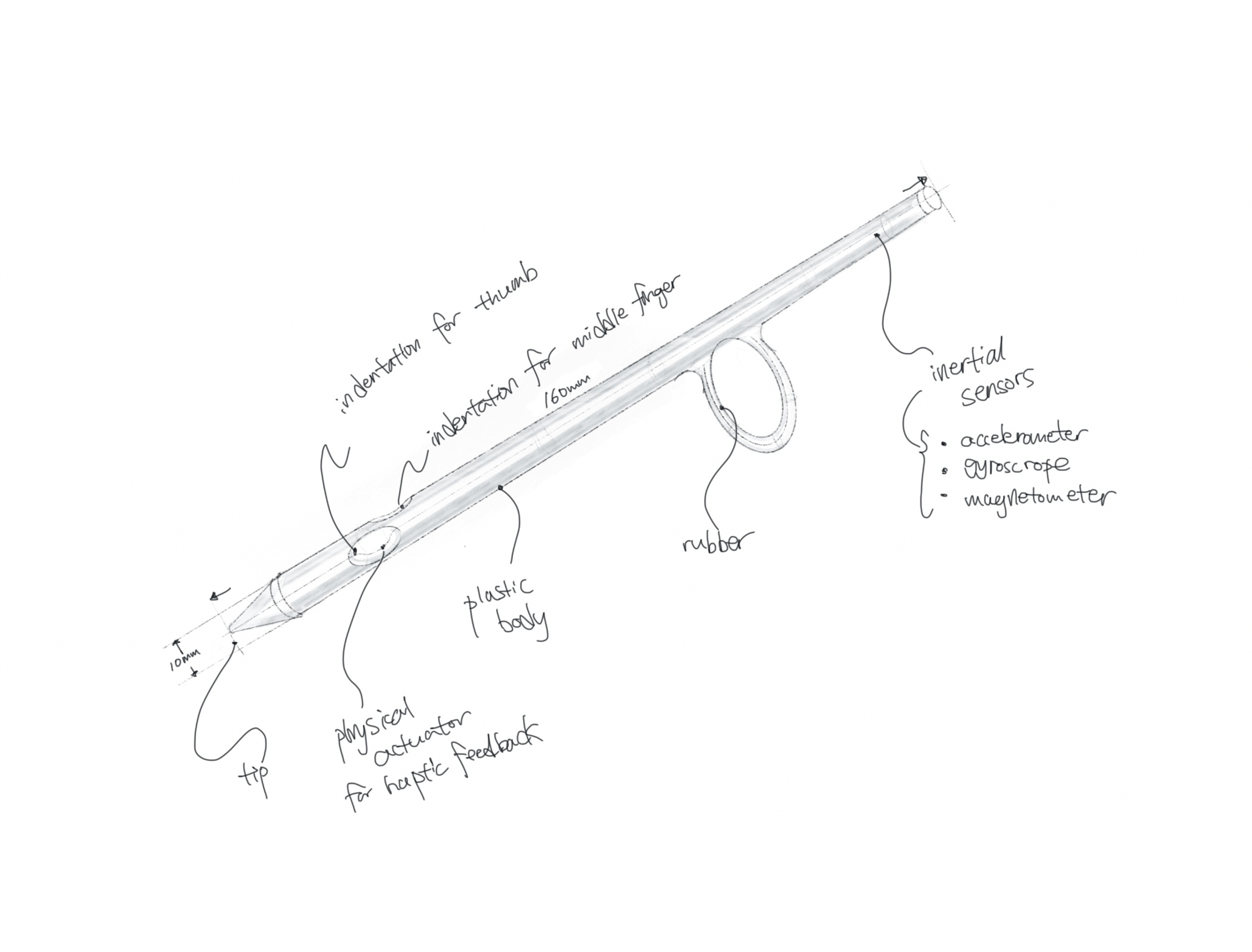
The Stylus-Ring is put on user’s thumb to allow users to quickly switch between different input devices without moving their arms. When users need to use the Stylus-Ring, they could grab its body to place their thumb and middle finger on the ergonomically designed indentations. This grabbing action will be detected by the inertial sensors since the tail end would be placed higher than the stylus tip when user grabs the stylus. From this sensor data, the Stylus-Ring infers that the user has resumed using the device. Then, it activates the device and sends a haptic feedback to user’s fingertips. This tactile signal would convey a sense of confirmation to the user that could lead to higher user satisfaction.
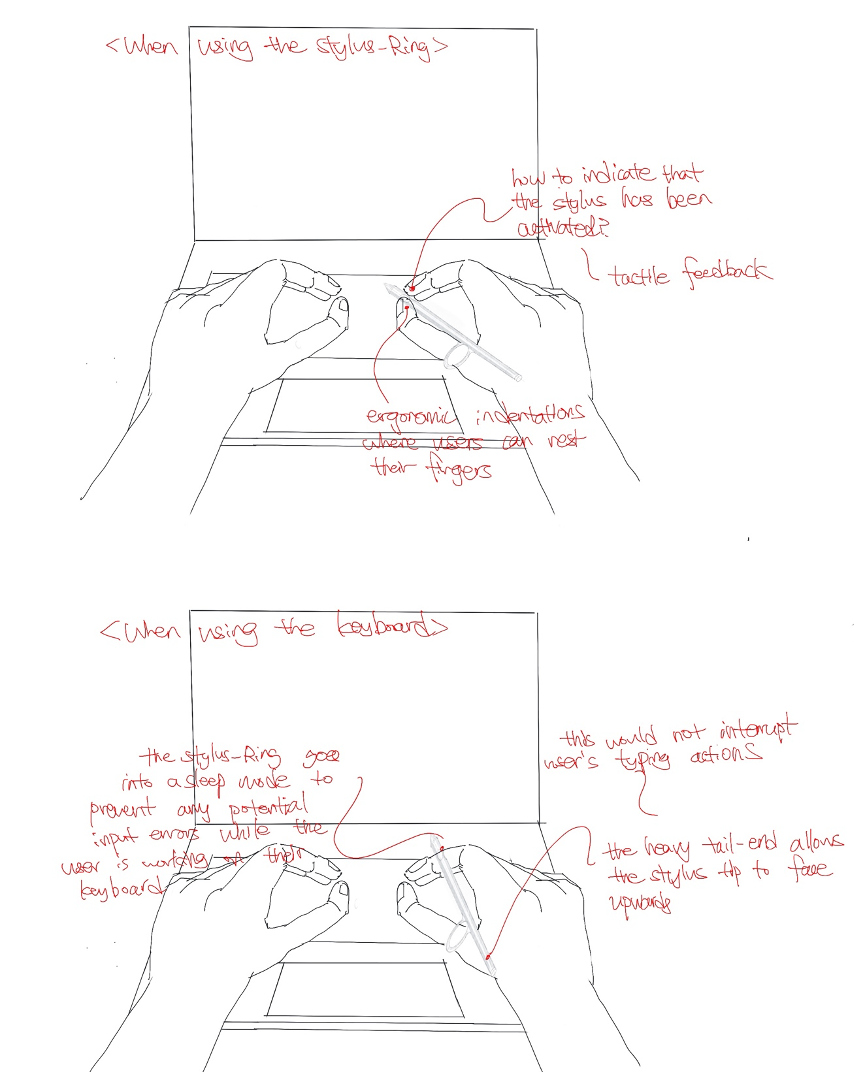
The Stylus-Ring is put on user’s thumb to allow users to quickly switch between different input devices without moving their arms. When users need to use the Stylus-Ring, they could grab its body to place their thumb and middle finger on the ergonomically designed indentations. This grabbing action will be detected by the inertial sensors since the tail end would be placed higher than the stylus tip when user grabs the stylus. From this sensor data, the Stylus-Ring infers that the user has resumed using the device. Then, it activates the device and sends a haptic feedback to user’s fingertips. This tactile signal would convey a sense of confirmation to the user that could lead to higher user satisfaction.
The Stylus-Ring must have a diameter between 7.0 and 20.0 mm (0.28 and 0.79 in.) in order to reduce user’s muscle fatigue.
The Stylus-Ring must have a length between 120 and 180 mm (4.7 and 7.1 in.) in order to prevent this device from interrupting user’s tasks, e.g. writing or drawing.
The inner side of the ring must be built with an elastic material (e.g. rubber) that does not exert too much pressure on user’s thumb.
The amount of friction from the inner side of the ring must not cause any skin damage through a normal use of this device.
The Stylus-Ring must achieve the accuracy rate of 95% when the device attempts to detect user’s device-switching behavior through the three inertial sensors—an accelerometer, a gyroscope, and a magnetometer—and activates the device successfully to minimize user’s frustration.
The Stylus-Ring must be accompanied with a manual that informs users that this device is intended to be used by teenagers and adults since children could have a difficulty putting on this device on their thumb.